Podcast Team Collaboration Tools: Why Post-Production Workflows Matter in 2025
According to Edison Research’s Infinite Dial 2024, 47% of Americans now listen to podcasts monthly, up 12% year over year. The podcast industry has matured from a solo creator hobby into a collaborative media format. Yet most hosting platforms still treat team features as premium add-ons, hiding collaboration behind enterprise pricing tiers.
Here’s the problem: treating collaboration as a luxury feature is backwards thinking. Production companies managing multiple shows, co-hosted podcasts coordinating between hosts, and growing shows adding editors all need team workflows. The question isn’t whether your podcast will need collaboration. It’s when.
This guide covers everything you need to know about podcast team collaboration tools. We’ll break down permission systems, compare platform features and pricing, share workflow best practices, and explain why we built team features into VNYL from day one. Whether you’re a solo creator planning to scale or a production company evaluating platforms, you’ll understand exactly what collaboration features matter and what they should cost.
Quick Takeaways:
- 57% of podcasters now use AI-powered tools for production tasks, signaling industry-wide workflow sophistication
- Most platforms charge $20-50/month extra for team features or limit them to enterprise tiers
- Permission levels matter: Admin, Editor, and Contributor roles serve different workflow needs
- True team collaboration requires unlimited team members, role-based permissions, and episode status tracking
- The cost of collaboration shouldn’t scale with team size when cloud infrastructure makes per-user pricing unnecessary
Why Does Team Collaboration Matter for Podcasts?
The solo podcaster recording in a closet is increasingly the exception, not the rule. DemandSage’s 2025 podcast statistics project 584 million podcast listeners globally this year, with the industry valued at $8.4 billion in the US alone. This growth brings professionalization, and professionalization means teams.
The Shift from Solo to Team Production
Think about what goes into a polished podcast episode: research, scripting, recording, editing, show notes, artwork, scheduling, distribution, and promotion. A solo creator can handle all of this, but the time investment is substantial. Adding even one team member (an editor) can save 3-5 hours per episode.
Production quality expectations have risen alongside audience growth. Listeners now compare indie podcasts against shows from NPR, Spotify, and major media companies. Meeting those expectations often requires specialized skills: audio engineering, content strategy, social media promotion. Few solo creators excel at everything.
Types of Teams That Need Collaboration
Co-hosted shows are the most obvious case. Two or three hosts need shared access to upload episodes, review analytics, and coordinate publishing schedules. Without proper collaboration tools, this means sharing login credentials (a security risk) or emailing files back and forth (inefficient).
Shows with editors need permission systems. The editor should upload edited audio and mark episodes ready for review. They shouldn’t have access to billing or the ability to publish without approval. Granular permissions make this workflow smooth.
Production companies managing multiple podcasts need multi-show support with team access across shows. A producer overseeing five shows shouldn’t need five separate accounts. They need a dashboard view with the right permissions per show.
Podcast networks operate at even larger scale. Different team members handle different functions (sales, production, analytics) across a roster of shows. Enterprise-grade collaboration becomes essential.
Quick Takeaway: Team collaboration isn’t just for big podcasts. Any show that adds a co-host, hires an editor, or brings on a producer needs proper collaboration tools.
What Types of Collaboration Do Podcast Teams Need?
Different team roles require different access levels. Understanding these roles helps you evaluate whether a platform’s collaboration features actually serve your workflow.
Co-Hosts: Content Creation and Episode Approval
Co-hosts typically need full content access: uploading episodes, editing show notes, reviewing analytics, and approving episodes for publication. They’re creative partners, not just contributors.
The permission level: Usually Admin or Editor with publishing rights. They should see everything related to content and analytics. Billing access depends on your arrangement.
Editors: Audio Production and Upload Access
Editors handle the technical production work. They receive raw audio, process it, and upload the finished file. They need upload permissions and the ability to edit episode metadata (titles, descriptions, timestamps).
The permission level: Editor access with upload rights but without publishing authority. The host or producer reviews and publishes. Editors typically don’t need analytics or billing access.
Producers: Project Management and Scheduling
Producers coordinate the overall workflow. They track episode status (recording, editing, review, scheduled, published), manage publishing calendars, and ensure deadlines are met. They need visibility into everything but may not need to edit content directly.
The permission level: Admin access with analytics visibility and scheduling control. Producers often handle the final “publish” action after editor and host approval.
Managers and Executives: Analytics and Billing
For larger organizations, managers need analytics access to track performance across shows without getting involved in day-to-day production. They review download trends, listener demographics, and growth metrics to make strategic decisions.
The permission level: View-only analytics access, possibly with billing oversight. No content editing or publishing permissions needed.
How Do Permission Levels Work Across Platforms?
Permission systems vary significantly across podcast hosting platforms. Some offer granular, role-based access. Others provide only binary “admin or nothing” options that force you to over-permission team members.
The Permission Matrix
Here’s what a well-designed permission system should offer:
| Capability | Admin | Editor | Contributor | Viewer |
|---|---|---|---|---|
| Upload episodes | Yes | Yes | Yes | No |
| Edit metadata | Yes | Yes | Yes | No |
| Publish/schedule | Yes | Yes | No | No |
| View analytics | Yes | Yes | Limited | Yes |
| Manage team | Yes | No | No | No |
| Billing access | Yes | No | No | No |
| Delete episodes | Yes | No | No | No |
| Show settings | Yes | No | No | No |
Admin gets full control: all permissions, including billing, team management, and show settings. This should be limited to owners and trusted partners.
Editor can create and modify content, including publishing. They can’t manage team members or access billing. Good for co-hosts and senior producers.
Contributor can upload and edit content but requires approval to publish. Perfect for editors who prepare episodes for review.
Viewer has read-only access to analytics. Useful for managers or stakeholders who need visibility without editing access.

Security Considerations
Granular permissions aren’t just about workflow efficiency. They’re about security. Every person with admin access is a potential point of vulnerability. If an editor’s account is compromised, you want the damage limited to content access, not billing changes or team management.
The principle of least privilege applies: give team members only the permissions they need for their specific role. A platform that forces you to give everyone admin access is a platform with a security gap.
Post-Production Collaboration vs Editing Collaboration
Before diving into platform comparisons, let’s clarify scope. This post focuses on post-production collaboration: the workflow after recording is complete, handled within your hosting platform. This includes uploading, metadata editing, scheduling, publishing, and analytics review.
Editing collaboration happens in separate tools. If you need multiple editors working on the same audio file simultaneously, you’re looking at DAWs (digital audio workstations) like:
- Descript: Collaborative transcription-based editing
- Adobe Audition: Professional multi-track editing with shared projects
- Audacity: Free, local editing (no built-in collaboration)
- Riverside: Remote recording with collaborative editing features
These tools handle the creative editing process. Your hosting platform handles everything after the edited file is ready.
The Handoff Workflow
A typical team workflow looks like this:
- Recording happens in your DAW or remote recording tool
- Editing happens in your audio editing software
- Handoff: Editor exports final audio and uploads to hosting platform
- Metadata: Editor or producer adds show notes, timestamps, artwork
- Review: Host or producer reviews the complete episode
- Scheduling: Episode is scheduled for publication
- Publishing: Episode goes live at scheduled time
- Analytics: Team reviews performance after publication
The hosting platform collaboration features cover steps 3-8. The editing collaboration tools cover steps 1-2. Make sure you’re evaluating the right category of tool for your needs.
Which Platforms Offer Team Features?
Now let’s compare actual platform offerings. Team collaboration support varies dramatically across the podcast hosting landscape.
Platform Comparison Table
| Platform | Team Members | Permission Levels | Multi-Show | Team Pricing |
|---|---|---|---|---|
| VNYL | Unlimited | Role-based | 2-30 shows | Included all plans |
| Transistor | Unlimited | Per-show roles | Unlimited | Included all plans |
| Buzzsprout | Unlimited | Basic (admin/member) | 1-6 shows | Included all plans |
| Libsyn | Limited | Higher tiers only | 1-3 shows | $20-40/mo extra |
| Captivate | Unlimited | Role-based | Unlimited | Included all plans |
| Anchor/Spotify | Limited | Basic only | Unlimited | Free |
| Podbean | Limited | Basic | 1-10 shows | Higher tiers |
| Simplecast | Unlimited | Enterprise-grade | Unlimited | Enterprise pricing |
Transistor: The Multi-Show Standard
Transistor’s collaboration features set the standard for podcast networks. You get unlimited team members on all plans, with per-show permission settings. Each show can have its own group of collaborators with different access levels.
The strength is flexibility: add five people to Show A and three different people to Show B, with customized permissions for each. The weakness is download-based pricing. Those team features are included, but you’ll pay $19/month for 20K downloads, jumping to $49 at 100K.
Buzzsprout: Simple but Limited
Buzzsprout offers unlimited team members with a straightforward approach. You add people to your account, and they can manage your podcast. The permission system is simpler than competitors: essentially admin or member access without granular role customization.
For small teams (2-3 people), this simplicity works fine. For larger operations needing specific permission levels per role, you’ll find Buzzsprout limiting.
Libsyn: Legacy Limitations
Libsyn has been around since 2004, but their team features reflect that age. Team member access requires higher pricing tiers, and the permission system lacks the granularity of modern platforms. If you’re already on Libsyn and happy with other features, the team limitations may be acceptable. For new podcasters building team workflows, look elsewhere.
Enterprise Options (Simplecast, Megaphone, Art19)
Enterprise platforms offer sophisticated team collaboration with features like single sign-on (SSO), audit logs, and granular permissions across large team structures. The trade-off is pricing: typically $200-500+ per month with annual contracts. Unless you’re managing 10+ shows with complex organizational needs, enterprise platforms are overkill.
What Are the Best Workflow Practices for Podcast Teams?
Having the right tools matters, but so does using them effectively. Here are workflow patterns that successful podcast teams follow.
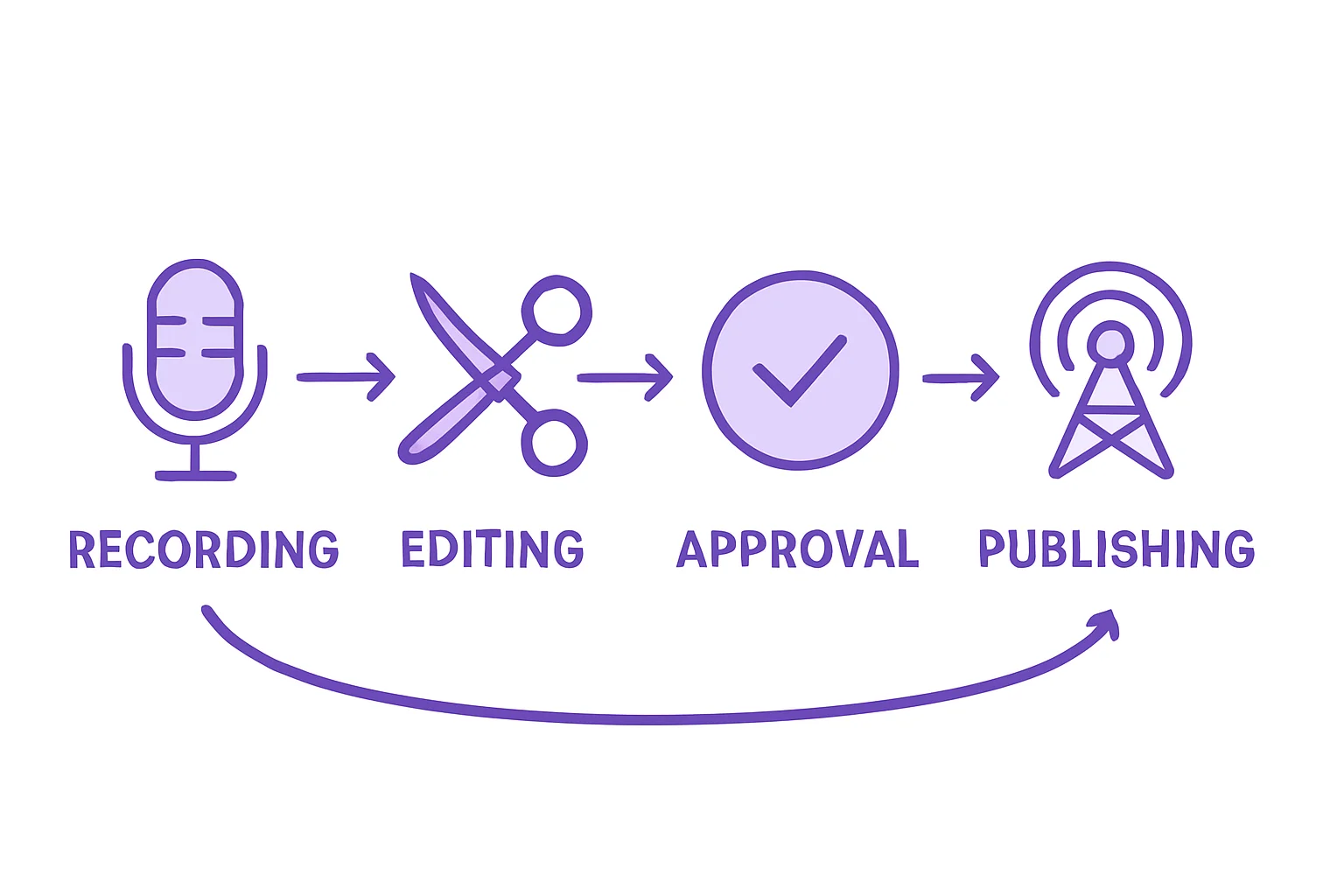
The Recording to Publishing Pipeline
Stage 1: Recording Complete
- Host marks recording as done in shared tracker
- Raw audio files uploaded to shared storage (Dropbox, Google Drive)
- Editor receives notification to begin work
Stage 2: Editing in Progress
- Editor downloads raw audio
- Editing happens in DAW
- Editor uploads finished audio to hosting platform
- Episode marked as “Ready for Review”
Stage 3: Review and Approval
- Producer or host reviews episode
- Show notes, timestamps, artwork verified
- Feedback provided or episode approved
- Episode marked as “Approved”
Stage 4: Scheduling
- Approved episode scheduled for publication
- Publication time set based on audience analytics
- Social media promotion scheduled
Stage 5: Publication
- Episode publishes automatically at scheduled time
- RSS feed updates
- Distribution to Apple Podcasts, Spotify, etc.
Stage 6: Post-Publication
- Team reviews initial download metrics
- Social engagement monitored
- Feedback incorporated into future episodes
Communication Integration
The best workflows integrate your hosting platform with team communication tools. Some approaches:
Slack/Discord notifications: Some platforms offer webhook integrations that post updates when episodes are uploaded, approved, or published. This keeps the team informed without email chains.
Shared calendars: Sync your publishing schedule with Google Calendar or similar tools. Everyone sees upcoming episodes and deadlines.
Project management tools: For larger productions, link episode status to Notion, Asana, or Trello boards. Track each episode from concept through publication.
For more on optimizing your publishing workflow, see our guide on scheduling and workflow automation.
Episode Status Tracking
Clear status labels eliminate the “is this episode ready?” confusion:
- Draft: Episode created but not complete
- Editing: With editor for production
- Review: Ready for host/producer review
- Approved: Cleared for scheduling
- Scheduled: Publication time set
- Published: Live and distributed
Every team member should see current status at a glance. Platforms with built-in status tracking reduce coordination overhead significantly.
How Much Does Team Collaboration Cost?
Let’s talk money. Team collaboration pricing falls into three models: included, tiered, and per-user.
Cost Analysis by Team Size
Here’s what you’ll pay annually for team collaboration across different team sizes:
| Platform | 3-Person Team | 5-Person Team | 10-Person Team |
|---|---|---|---|
| VNYL | $90/year | $90/year | $90/year |
| Transistor | $228/year | $228/year | $228/year |
| Buzzsprout | $228/year | $228/year | $228/year |
| Captivate | $228/year | $228/year | $228/year |
| Libsyn | $420/year | $420/year | $420/year |
Note: These figures assume base plan pricing. Download overages on Transistor/Captivate and storage overages on Libsyn/Buzzsprout are additional costs.
The Hidden Cost of Per-User Pricing
Some enterprise platforms charge per-user, typically $10-25 per team member monthly. A 5-person team at $15/user adds $75/month ($900/year) to your hosting costs. A 10-person team adds $1,800/year.
This pricing model made sense when software was expensive to scale. In 2025, adding users to a cloud platform costs the hosting company nearly nothing. Per-user pricing is a revenue strategy, not a cost reflection.
Why Collaboration Should Be Standard
Cloud infrastructure costs have dropped dramatically. According to industry data, storage and bandwidth costs are down 85-90% since 2010. The marginal cost of adding team members to a hosting platform is effectively zero.
Platforms charging extra for team features are capturing profit margin, not covering costs. When we built VNYL, we made team collaboration standard because it should be standard. Your hosting cost shouldn’t increase just because you hired an editor.
For a complete comparison of hosting costs at scale, check our podcast hosting platform comparison guide.
VNYL’s Team Collaboration Approach
When we designed VNYL’s team features, we started with a question: what do podcast teams actually need?
Unlimited Team Members, All Plans
Every VNYL plan includes unlimited team members. Add your co-host, editor, producer, and manager without additional fees. Your hosting cost stays flat whether you’re a solo creator or a 15-person production team.
Role-Based Permissions
VNYL supports granular permission levels. Set each team member’s access based on their actual role:
- Admin: Full access including billing and team management
- Editor: Content creation and publishing, no billing access
- Contributor: Upload and edit, requires approval to publish
- Viewer: Analytics access only
Assign permissions per person. Your editor gets Editor access. Your accountant gets Viewer access to analytics. Your co-host gets Admin or Editor based on your partnership structure.
Episode Status Tracking
Every episode in VNYL shows clear status: Draft, Editing, Review, Approved, Scheduled, Published. Your team sees where each episode stands in the workflow without asking. Status updates trigger notifications so relevant team members know when action is needed.
Multi-Show Support
VNYL plans support 2-30 shows depending on tier (2 on Starter, 10 on Pro, 30 on Business). Team permissions can be set per show, so your editor for Show A doesn’t automatically access Show B. Production companies get the multi-show management they need with appropriate access controls.
(This is exactly why we built team features standard. Collaboration shouldn’t be a premium tier. It should be table stakes for any serious hosting platform.)
For podcasters who need truly unlimited hosting without download caps or storage limits, team features included at no extra cost fundamentally changes the economics.
Make Team Collaboration Work for You
The podcast industry’s shift toward team production isn’t slowing down. Whether you’re adding your first editor or scaling a production company, collaboration tools will determine your workflow efficiency.
Here’s the action plan:
Evaluate your current workflow. Map out who does what in your podcast production. Identify handoff points and communication bottlenecks. This reveals what collaboration features you actually need.
Audit your platform’s team features. Check your current hosting for team member limits, permission levels, and per-user costs. Many podcasters don’t realize they’re paying extra for collaboration or missing features their platform offers.
Choose based on team growth. Your podcast might be solo today. But if you plan to add an editor in six months or launch a second show next year, choose a platform with team features built in. Migration is painful.
Implement status tracking. Even a two-person team benefits from clear episode status. “Is this ready to publish?” emails waste everyone’s time. Status visibility solves this.
The 584 million podcast listeners projected for 2025 represent a massive audience. Reaching them consistently requires efficient team workflows, not heroic solo efforts. The platforms that treat collaboration as standard, not premium, are the platforms built for where podcasting is heading.
Ready to collaborate without collaboration fees? VNYL includes unlimited team members and role-based permissions on every plan. Try it free and see how team workflows should actually work.
For managing multiple shows with team features, multi-show support becomes essential as your podcast portfolio grows.
Want more podcasting workflow tips? Join our newsletter at vnyl.fm for weekly insights on growing your podcast.